brightctrl --version
brightctrl 0.2.3

brightctrl
Monitor brightness, straight from your terminal.
Adjust the brightness of your external monitors without leaving the keyboard. A single native binary — no ddcutil, no Node.js, no runtime dependencies. Linux talks DDC/CI directly over i2c; Windows uses the Monitor Configuration API.
npx brightctrl
# or grab a binary from the latest release
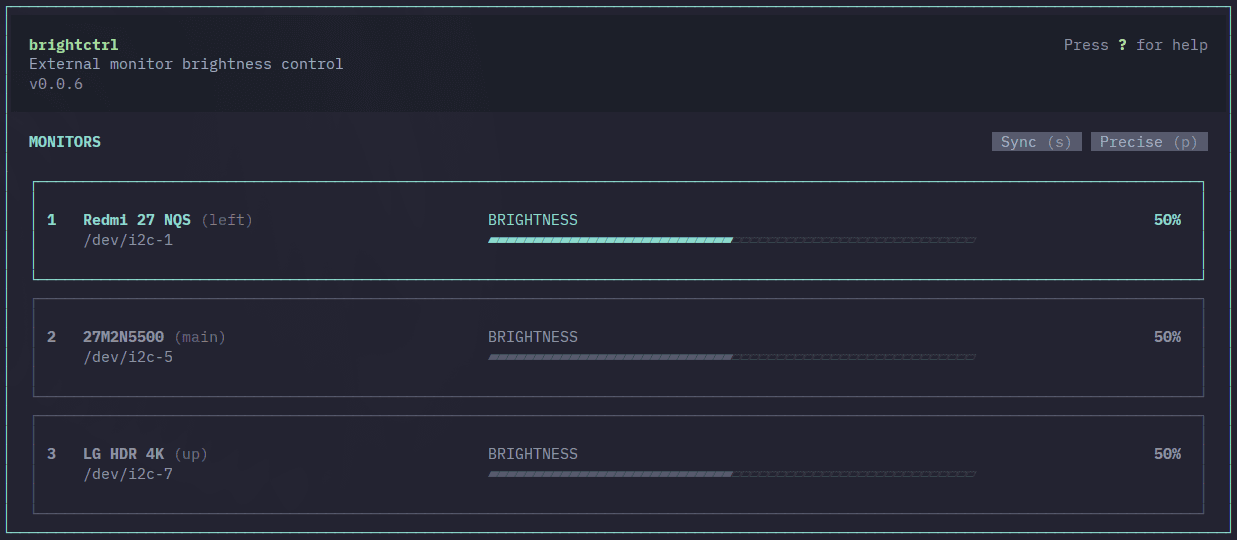
brightctrl --help
Description
- One native binary — no ddcutil, no Node.js, no runtime deps.
- DDC/CI straight over i2c on Linux; Monitor Configuration API on Windows.
- A TUI when you want one, a CLI when you're scripting.
- Name a monitor once, then target it by alias instead of an id.
- Sync every monitor at once, or drop to 1% steps.
- Config is plain TOML at ~/.config/brightctrl/config.toml.
Commands
- brightctrl
- open the interactive TUI
- brightctrl list
- monitors with ids, aliases, brightness
- brightctrl get <target>
- print brightness (0-100)
- brightctrl set <target> <0-100>
- set brightness
- brightctrl alias <id> <name>
- name a monitor
- brightctrl alias <id>
- remove the alias
# <target> is a monitor number (1), an id (GSM7707), or an alias (left).
# press ? in the TUI
- ↑ ↓ / k j
- Pick a monitor
- ← → / h l
- Brightness down / up
- 1 – 9
- Select monitor by number
- /
- Type an exact value (0-100)
- p
- Precise mode — 1% steps
- s
- Sync — all monitors at once
- m
- Set brightness to 0
- r
- Refresh monitor list
- ?
- Help
- q
- Quit
Install
npx brightctrlyay -S brightctrlscoop install brightctrlwinget install shahriyardx.brightctrlcargo install --git https://github.com/shahriyardx/brightctrl# DDC/CI needs the i2c module and group access — once.
sudo modprobe i2c-dev
echo i2c-dev | sudo tee /etc/modules-load.d/i2c.conf
sudo usermod -aG i2c $USER   # then log out and back in
# On Windows: nothing to do — just enable DDC/CI in your monitor’s OSD if list comes up empty.
# ~/.config/brightctrl/config.toml
[aliases]
GSM7707 = "left"
27M2N5500 = "main"
LG-HDR-4K = "up"
# Aliases live here. Set them with brightctrl alias — or edit the file.
cat Cargo.toml
Rust · ratatui · clap · ddc · serde · toml — Linux i2c and the Windows Monitor Configuration API, from one source tree. MIT.